
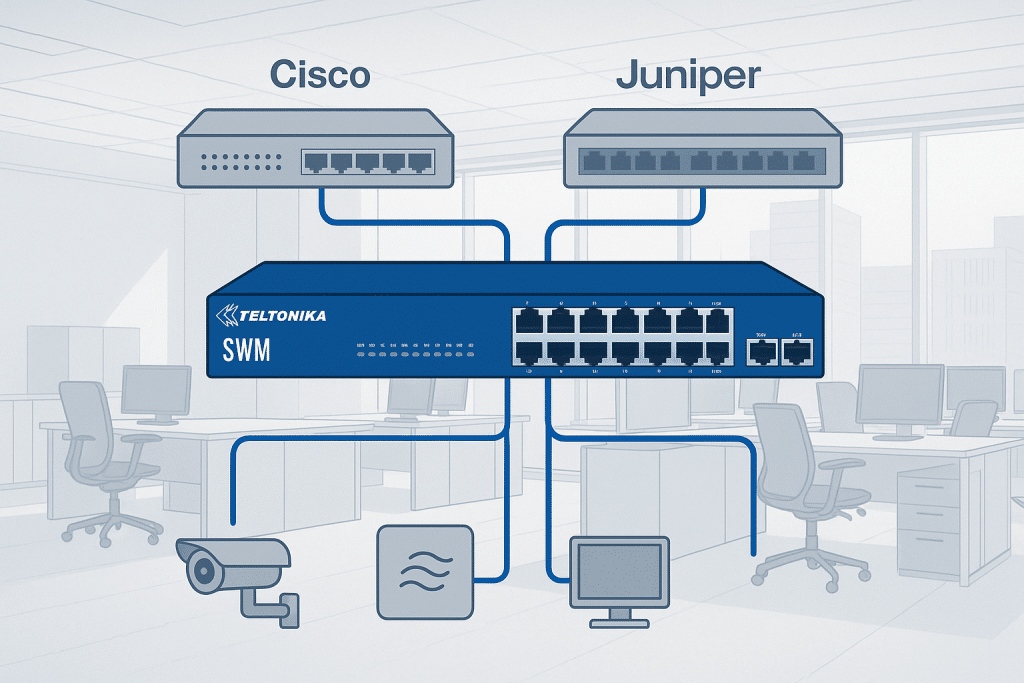
Designed to Integrate Seamlessly with Existing Cisco, Juniper, HPE, Extreme, and Other Proprietary Network Environments
Most networks today are a mix of everything: Cisco or Juniper at the core, a patchwork of cheap unmanaged switches at the edge, some industrial PLCs on their own island, and now camera systems, Wi-Fi, sensors and IoT devices piled on top.
The result is familiar:
more boxes, more power injectors, more licences, and more things that break.
The Teltonika switch range is Teltonika’s answer to that chaos. It covers:
-
TSW unmanaged industrial switches for simple, reliable connectivity at the edge
-
TSW202 for compact managed PoE access
-
SWM280 / SWM281 / SWM282 for full L2+ / L3 managed switching with industrial protocol support and 24 months of RMS included
The goal is simple: an open, standards-based switching family that can sit comfortably inside existing Cisco, Juniper, HPE or Extreme environments without dragging you into another closed ecosystem.
1. The Teltonika Switch Families At A Glance
Teltonika split their switch portfolio into two main lines:
- TSW series – industrial, compact, mostly unmanaged switches for edge and cabinet use
- SWM series – enterprise and industrial managed switches with advanced L2+ / L3 features and industrial protocols
Between them, you can cover everything from a tiny DIN rail cabinet feeding a handful of devices, up to a rackmount switch powering an entire CCTV estate or industrial line.
2. TSW Series – Simple, Rugged Industrial Connectivity
The TSW series is about one thing: plug it in, forget about it, and let it run for years.
These switches are fanless, DIN rail or wall mount, with aluminium housings and wide DC input ranges. They are built to live in panels, vehicles and plant rooms, not just pretty server racks. teltonika-networks.com+1
You can think of the TSW family in three main groups.
2.1 Compact edge switches – TSW010, TSW110, TSW114
These are the “connect anything, anywhere” models.
TSW010
- 5 × 10/100 Mbps Ethernet ports
- Industrial DIN rail design
- Lowest power consumption in the range
- 2 pin DC input with tiny idle draw
- Perfect for low bandwidth control networks and simple device fan-outs
TSW110
- 5 × Gigabit ports
- Unmanaged L2 switch
- Wide 9–30 V DC input
- Built for higher bandwidth industrial applications where you still want plug and play
TSW114
- 5 × Gigabit ports
- Integrated DIN rail bracket and front facing ports
- 9–30 V DC supply, reverse polarity and surge protection
- Ideal inside control cabinets that need neat cable routing and reliable Gigabit connectivity
These are the boxes you drop in when you simply need “more ports on the DIN rail” and you never want to think about them again.
2.2 Small PoE edge switches – TSW100 and TSW101
When you need both power and data from a tiny switch, these two do most of the work.
TSW100 – 5-port industrial PoE+ switch
- 5 × Gigabit ports, 4 with PoE+ (802.3af/at)
- Up to 30 W per PoE port, 60 W total budget
- Classified as PSE, centralises power supply for small PoE loads
- Ideal for a handful of cameras, APs or IP phones in a cabinet
TSW101 – automotive PoE+ switch
- 5 × Gigabit ports, 4 with PoE+
- Designed for 12 V / 24 V battery power
- Rugged housing for in-vehicle and transport use
- Great for on-board Wi-Fi, cameras, telematics and small edge devices in vehicles
Both are unmanaged. No menus, no config. Just power and data.
2.3 Higher density PoE and SFP – TSW200 and TSW210
Where TSW gets serious is at the eight port level with fibre.
TSW200 – 8 port PoE+ with 2 SFP
- 8 × Gigabit ports with PoE+ (802.3af/at)
- 2 × SFP ports for long range fibre
- Up to 30 W per port with 240 W total PoE budget
- Classified as PSE, ideal for powering multiple cameras or APs from a single industrial switch
TSW210 – 8 Gigabit + 2 SFP (no PoE)
- 8 × Gigabit ports
- 2 × SFP ports
- Unmanaged, industrial DC input (7–57 V)
- Used where you simply need a tough 8+2 switch and PoE is handled elsewhere
These are perfect in edge cabinets where you want simple fan-out, fibre uplink and either PoE injection (TSW200) or pure data (TSW210).
2.4 TSW202 – the bridge between TSW and SWM
One TSW deserves its own mention.
TSW202 is a managed PoE+ switch with:
- 8 × Gigabit PoE+ ports (30 W each, 240 W total)
- 2 × SFP ports
- L2 management with some L3 capability
- Support for EtherNet/IP, Profinet and MRP industrial protocols
It is basically the “access layer” managed switch for industrial and compact cabinets, sitting between:
- Pure unmanaged TSW models
and - The bigger SWM28 rackmount managed switches
If you need granular PoE management and industrial protocol awareness in a small box, TSW202 is the one you reach for.
3. SWM28 Series – Full Managed Switching For Enterprise And IIoT
The SWM280, SWM281 and SWM282 are where Teltonika step fully into the enterprise switch space.
All three are:
- 1U rackmount
- L2 managed with enhanced L3 features
- Run Teltonika’s TSWOS (OpenWrt-based OS)
- Support dynamic routing (OSPF, BGP, RIP, EIGRP)
- Speak industrial languages like Profinet, EtherNet/IP and MRP
- Ship with 24 months of Teltonika RMS Management included
This is what lets them sit happily in Cisco, Juniper, HPE or Extreme environments and still talk to PLCs, cameras and sensors as first class citizens.
3.1 SWM280 – mixed PoE / non PoE
- 12 × PoE+ Gigabit ports
- 12 × non PoE Gigabit ports
- 4 × SFP uplinks
Ideal when you have a mix of powered devices and simple LAN kit at the same location.
3.2 SWM281 – non PoE managed switch
- 24 × Gigabit ports
- 4 × SFP uplinks
Used as a clean L2/L3 access or aggregation switch where PoE is not required but routing, VLANs and industrial protocol awareness are.
3.3 SWM282 – high density PoE+ for CCTV and IoT
- 24 × PoE+ Gigabit ports
- 30 W per port, 300 W total budget
4 × SFP ports
Perfect when virtually every port needs both power and data, particularly for CCTV, Wi-Fi, access control and dense sensor networks.
4. SWM28 Comparison – Choosing The Right Model
Here is the comparison chart you already liked, kept intact.
| Feature | SWM280 | SWM281 | SWM282 |
|---|---|---|---|
| PoE Support | Yes (12 ports) | No | Yes (24 ports) |
| Total Ports | 24 (12 PoE + 12 non PoE) | 24 (non PoE) | 24 (all PoE+) |
| PoE Budget | 240 W | N/A | 300 W |
| Max Power per Port | 30 W | N/A | 30 W |
| Uplink Ports | 4 × SFP | 4 × SFP | 4 × SFP |
| Switching Capacity | 56 Gbps | 56 Gbps | 56 Gbps |
| Dynamic Routing | Yes | Yes | Yes |
| Profinet Support | Optional | Optional | Optional |
| EtherNet/IP | Yes | Yes | Yes |
| MRP | Yes | Yes | Yes |
| 802.1X + Radius/TACACS+ | Yes | Yes | Yes |
| RMS Included | 24 months | 24 months | 24 months |
| Best Use Case | Mixed cabinets (CCTV + PLC + IoT) | Core aggregation / industrial networks | High density CCTV, Wi-Fi, sensors |
5. Open Standards – Why These Switches Work Inside “Closed” Networks
The big selling point to an enterprise or industrial customer is not that Teltonika make another switch. It is that they make switches that do not try to own the whole network.
5.1 Cisco, Juniper, HPE, Extreme compatibility
The SWM and TSW202 managed switches support:
- LLDP for neighbour discovery
- SNMP v2/v3 for monitoring
- 802.1Q VLANs and trunking
- 802.1X with Radius and TACACS+
- Static and dynamic routing (OSPF, BGP, RIP, EIGRP on SWM)
So you can:
- Plug an SWM282 into a Cisco Catalyst stack and trunk VLANs like any other switch
- Let Juniper or Extreme kit see the SWM via LLDP and SNMP
- Keep authentication and policy in your existing Radius or TACACS+ infrastructure
- Use OSPF or BGP between SWM and your core without bolts-on or hacks
No proprietary controller required. No licence SKU just to turn on routing or QoS.
5.2 Industrial protocols on the same box
The same SWM and TSW202 switches that speak clean enterprise also understand:
- Profinet for Siemens environments
- EtherNet/IP for Rockwell and CIP based systems
- MRP rings for resilient OT networks
That means:
- One switch can serve cameras, APs, office devices, PLCs and sensors
- You do not have to run parallel “OT only” switches next to enterprise hardware
- Diagnostics and redundancy work consistently from control room to cabinet
6. When To Use TSW, TSW202, And SWM – Practical Guidance
- TSW010 / 110 / 114 – ultra simple, unmanaged edge fan-out in cabinets or small panels where you just need more ports.
- TSW100 / 101 – small PoE injector switches for a handful of cameras, APs or in-vehicle kit.
- TSW200 / 210 – eight port edge with fibre; PoE+ if you need to power things, non PoE if you just need bandwidth.
- TSW202 – managed PoE+ switch for smaller cabinets where you still want VLANs, industrial protocols and PoE control but not a full 24 port rack unit.
- SWM280 / SWM281 / SWM282 – full fat managed switching for racks, control rooms and big comms cabinets where enterprise features, routing and lots of PoE matter.
Tie that to Teltonika routers and IoT SIMs and you have a single-vendor story from WAN to LAN to devices.
7. Millbeck – Teltonika Diamond Partner For Switches, Routers And IoT SIMs
Millbeck is a long standing Teltonika Networks Diamond Partner. That matters, because the moment you step into managed switching, SIM connectivity and remote access, you want a supplier who actually understands all three.
From Millbeck you get:
- The full Teltonika switch portfolio – TSW and SWM ranges
- Teltonika RUT and TRB routers for 4G, 5G and RedCap backhaul
- IoT SIM cards – multi network, roaming, private IP, NB IoT, LTE M and 5G
- Antennas, cabling and mounting hardware
- Design help – VLANs, PoE budgets, routing, RMS structure
- UK based support that actually knows the hardware, not just a catalogue page
Because Millbeck sits across routers, switches and IoT SIMs, you can treat the whole system as one solution instead of juggling multiple vendors and finger pointing.